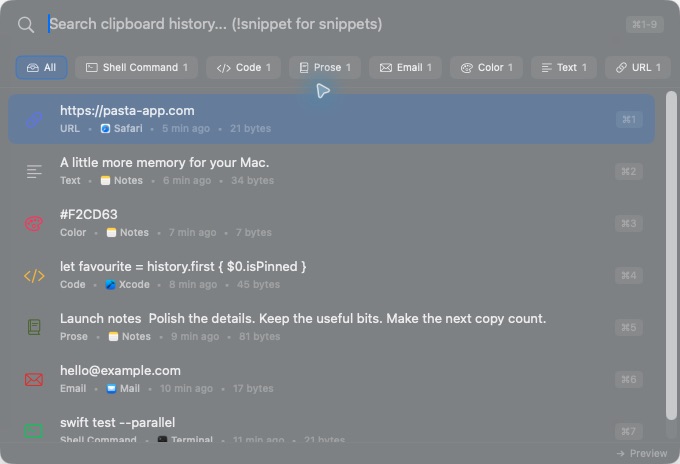
A fast, local-first clipboard history manager for macOS. Smart content detection, Spotlight-style search, snippets with dynamic placeholders, and a keyboard-first command mode.
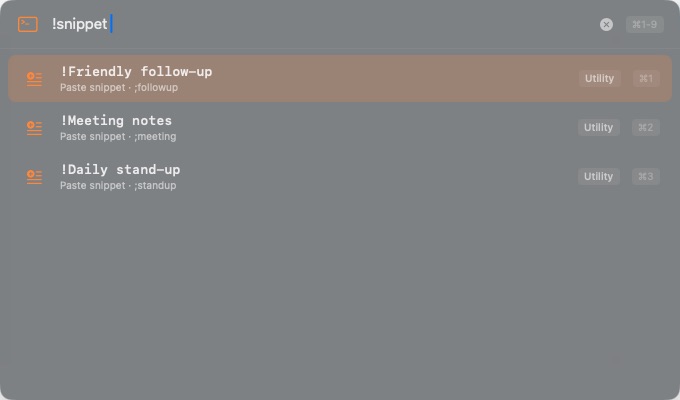
Saved clips that expand {date}, {datetime}, {clipboard:N}, {cursor}, and {uuid} at paste time. JSON import/export.
Type ! in Quick Search to clear history slices, toggle settings, switch themes, or jump anywhere β 40+ commands.
Pin entries to the top with ββ§P. Optional auto-injected Pinned section in Quick Search.
MAC addresses, credit cards (with masked preview), IBANs, and CSS colours with swatch previews.
β§Enter or β₯Enter strips formatting on paste. βO opens URL entries in your browser.
A new BM25 + recency ranker and a two-stage query that skips BLOB hydration for non-winning rows. Sub-millisecond on huge histories.
Honors the nspasteboard.org transient/concealed/auto-generated flags so password managers like 1Password & Bitwarden are never recorded.
Crash reports are off by default. Enable them in Settings β Diagnostics if you want to help β clipboard contents are never transmitted.
Every copy is saved automatically. Search through weeks of clipboard history instantly.
Auto-categorises emails, JWTs, API keys, code, URLs, env vars, file paths, IBANs, credit cards, colours and more β fifteen detectors out of the box.
Full-text search powered by SQLite FTS5 with a custom BM25 + recency ranker. Sub-millisecond on tens of thousands of items.
Global hotkey, full keyboard navigation, quick-paste by position, and paste-as-plain-text with β§Enter. Your hands never leave the keyboard.
Images, syntax-highlighted code, decoded base64, formatted JSON, colour swatches, and masked credit cards. See exactly what you copied.
Local by default β clipboard contents stay on your Mac. Items copied by 1Password, Bitwarden and other password managers are skipped automatically.
Type ! in Quick Search to access 40+ commands: clear history slices, toggle settings, switch themes, jump anywhere β without touching your mouse.
Pin clipboard entries to the top with ββ§P so the things you reach for stay one keystroke away β even after thousands of new copies.
Save reusable clips with dynamic placeholders like {date}, {datetime}, {clipboard}, {clipboard:N}, {cursor}, and {uuid}. JSON import/export included.
Opt in to sync clipboard history between Mac and iOS via your private CloudKit database. Off by default; flip it on in Settings whenever you want it.
Switch from Alfred, Maccy, Flycut, CopyClip, Paste, Pastebot, or Clipy. Export your data as JSON anytime.
Light, Dark, or follow your system. Choose between menu bar, Dock, or both. Make it yours.
Three strictness profiles, per-detector overrides, and advanced regex patterns with performance ratings. Build your own custom detectors too.
Press the global hotkey to summon a floating search panel from any app. Type to filter, use arrow keys to select, and press Enter to paste instantly.
Save the things you type all the time. Drop in placeholders and Pasta fills them in at paste time.
Built-in placeholders: {date}, {time}, {datetime}, {clipboard}, {clipboard:N}, {cursor}, {uuid} β with optional format strings.
Press ! in Quick Search to drive Pasta from the keyboard. Forty-plus commands across history, settings, and navigation.
Destructive commands prompt for confirmation. Filters mirror the sidebar so you can stay in the search field.
Enable iCloud Sync to access your clipboard history on both macOS and iOS. Pasta also picks up items from Continuity / Universal Clipboard automatically.
Fully optional and disabled by default β your data only leaves your Mac if you choose.
Import your existing clipboard history from any of these apps in one click.
Pasta stores your clipboard locally in a SQLite database on your Mac. No accounts. No telemetry by default. Items copied by password managers are skipped automatically. iCloud Sync and crash reporting are both opt-in β your data only leaves your Mac if you choose.
Pasta is free and open source. If you find it useful, consider supporting its development!
Download Pasta for free. Open source, always.
Requires macOS 14.0 (Sonoma) or later